Trace-First Workflow
"The thinking is the product. Everything else is output."


Semantic source: this English project guide and the English Project North Star define the public meaning of TFW. Russian and Kazakh are full localizations of this guide.
Imagine a product that knows more about itself than just its output — its purpose, its decisions, its rejected alternatives, its evidence, and its debt.
Most projects cannot explain themselves. Their reasoning lives in expired chats, in someone's head, or in meetings nobody recorded. A new teammate or a new AI session sees the output but not the goal, constraints, evidence, or safe next step.
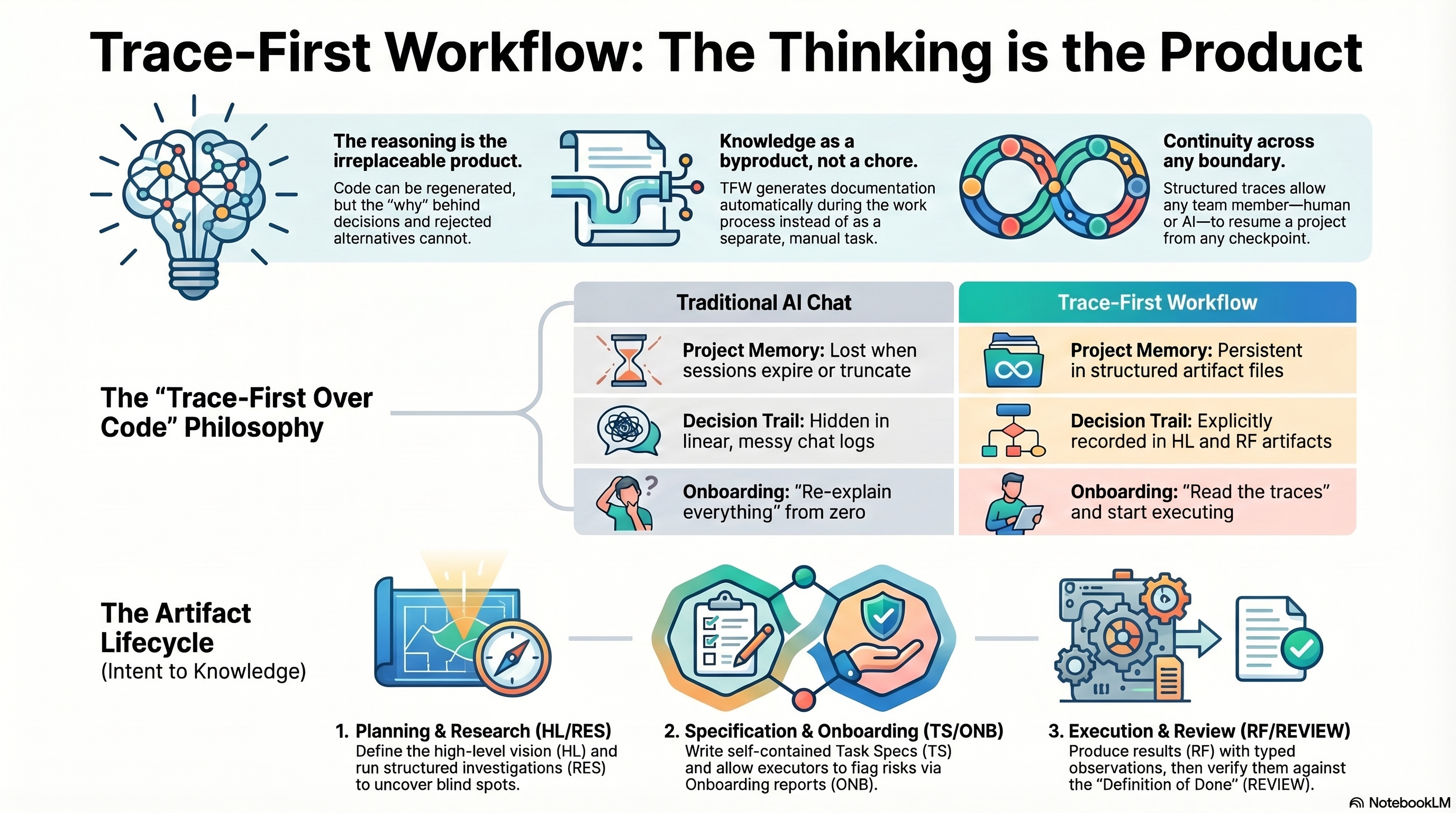
Trace-First Workflow (TFW) makes that work inspectable and continuable. TFW is a methodology for joint human–AI work, grounded in the Philosophy of Trace. Humans retain purpose, legitimate authority, judgment, acceptance, accountability, and responsibility to stop; agents perform bounded work. A Trace is selected durable context—not a raw transcript or hidden reasoning—that preserves decisions, results or current state, evidence, limits, and continuation.
This repository is the complete TFW starter: choose an Edition, place it in a project, and use its files and workflows to leave enough reliable context for the next authorized person or agent. TFW does not promise automatic truth, identical reproduction, self-maintaining documentation, or independent agent authority.
For the full philosophical argument, read the Project North Star. This README stays a practical project guide.
Editions
TFW offers two Editions for project work: Assisted and Full. They provide different amounts of discipline, not ranks of personal maturity.
| Edition | Choose it when | What you get | Start here |
|---|---|---|---|
| Assisted | Work repeats, two or three participants need separate ownership, or missed trace/status updates recur | Result-first planning, task traces, handoff and independent review; the documented manual path remains complete | editions/02-assisted/ |
| Full | Work is long-running, cross-functional, regulated, or expensive to get wrong; formal research, evidence, review, and knowledge gates are needed | The complete HL → RES → TS → ONB → RF → REVIEW lifecycle |
.tfw/ |
Offer only Assisted or Full for project setup, including education, research and learning requests. Recommend the smallest of these two that meets the work's needs. Copy the contents of the selected directory into the project root; do not work inside a nested edition directory. See the Edition selection and migration guide.
Who TFW Is For
Teams and individuals who cannot afford to lose the reasons behind their work. TFW is domain-agnostic: its practical discipline applies to software, analytics, research, writing, education, design, and business operations.
| #### 🎯 Product leaders carrying decisions across teams Strategy discussed in one session may not reach the person implementing it. When participants change, the rationale and rejected options disappear. TFW leaves inspectable decisions, authority, evidence, and next steps so another authorized participant can continue without inventing the missing context. |
| #### 🔬 Analysts and researchers building knowledge iteratively Earlier analysis is hard to discover, research iterations lose their assumptions, and a final report rarely exposes the choices that shaped it. TFW keeps each iteration and its findings, tested hypotheses, limits, and decisions available for later verification and consolidation. |
| #### ⚙️ Product-minded engineers preserving architecture context Code records what exists, not necessarily why it was built that way. TFW keeps architecture decisions, constraints, rejected alternatives, evidence, and technical debt near the implementation so a new developer can inspect the reasoning before changing it. |
Quick Start
Start by choosing an Edition. If you are unsure, give the agent the Edition guide and describe the work, participants, duration, and cost of a missed update. The agent should recommend Assisted or Full and explain why; the human decides.
New project — start from scratch
Copy this prompt into an agent that can read and edit files:
I want to start a new project with Trace-First Workflow (TFW).
Fetch only the framework of its newest release into a temporary directory <temp>, with <tag> the
highest vX.Y.Z without a suffix in git ls-remote --tags --refs https://github.com/saubakirov/trace-first-starter:
git clone -c core.autocrlf=false -c core.attributesFile= --filter=blob:none --sparse --depth 1 --branch <tag> https://github.com/saubakirov/trace-first-starter <temp>
git -C <temp> sparse-checkout set .tfw editions
Read editions/README.md, recommend Assisted or Full for my work, and explain the choice.
After I choose, copy the contents of that Edition into my project root and follow its README.
If I choose Full, follow .tfw/quickstart.md from <temp> step by step.
My project is about: <describe the project, participants, duration, and risk>
Existing project — add TFW without losing state
I want to add Trace-First Workflow (TFW) to this existing project.
First inspect the repository and identify files or traces that must be preserved.
Fetch only the framework of its newest release into a temporary directory <temp>, with <tag> the
highest vX.Y.Z without a suffix in git ls-remote --tags --refs https://github.com/saubakirov/trace-first-starter:
git clone -c core.autocrlf=false -c core.attributesFile= --filter=blob:none --sparse --depth 1 --branch <tag> https://github.com/saubakirov/trace-first-starter <temp>
git -C <temp> sparse-checkout set .tfw editions
Read editions/README.md and recommend Assisted or Full for my work.
Do not overwrite project state. Use the selected Edition's migration path;
for Full, follow .tfw/quickstart.md from <temp>.
My project is about: <describe the project, participants, duration, and risk>
To adopt Assisted in an existing project, follow editions/02-assisted/MIGRATION.md and preserve its goal, tasks, traces, results, and memory. Move to Full when the work needs the complete formal lifecycle.
Already configured — start working
Read AGENTS.md and the active Edition instructions for project context.
Give me the current state and the next safe action.
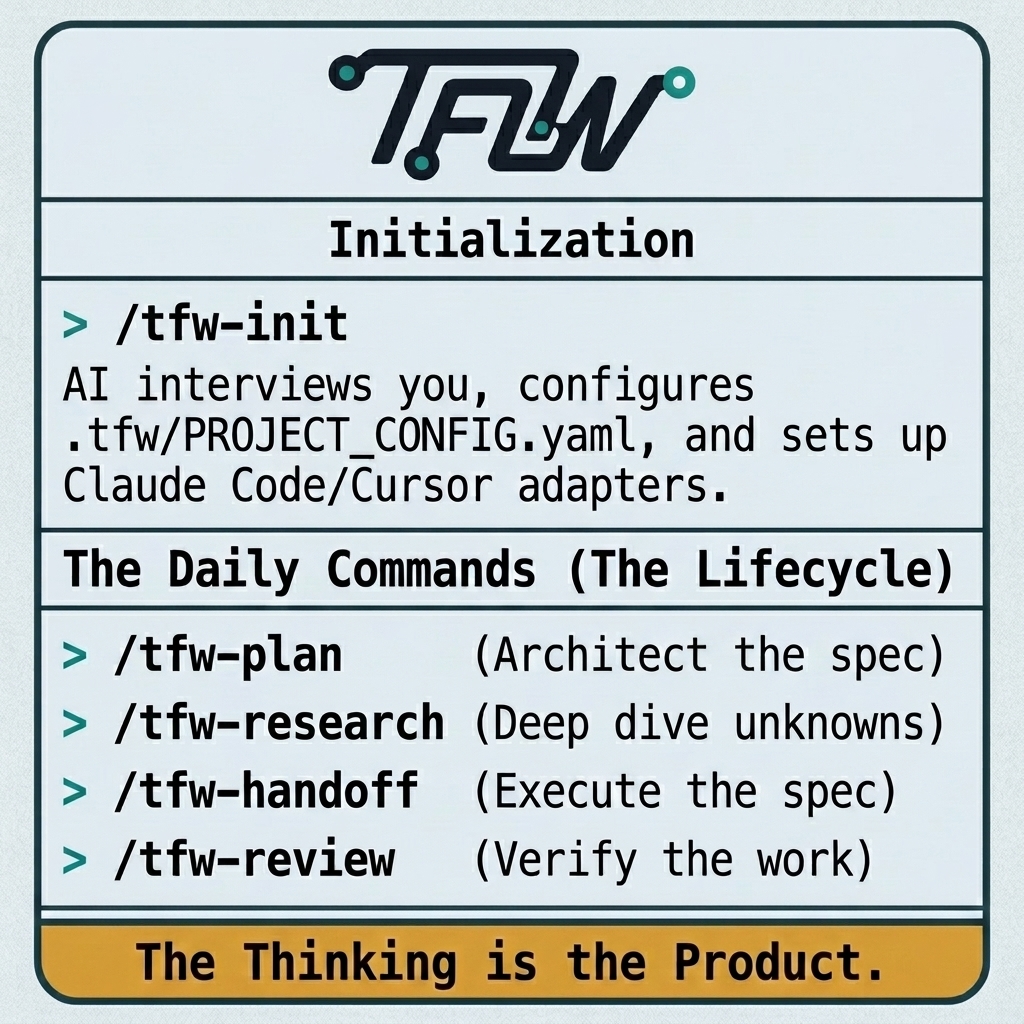
For a new Full TFW task, start with: /tfw-plan
Task: <describe the result you need>
In Full TFW, use /tfw-plan to create or revise a task plan and to re-enter interrupted work, /tfw-handoff to execute an approved TS, and /tfw-review to independently verify completed work. Other repository workflows use /tfw-research, /tfw-docs, /tfw-knowledge, /tfw-release, /tfw-update, /tfw-config, and /tfw-init.
Codex users: the same /tfw-* commands are implemented by repository-local skills, with root AGENTS.md as fallback routing; no Codex-specific wrapper is required. Installation and repair instructions are in .tfw/adapters/codex/.
FAQ
Do I need to read every framework file?
No. A human can begin with this guide, choose an Edition, and let the agent follow the edition instructions. Reading the Project North Star is recommended when you want the full purpose and philosophical boundary. Mechanics are in .tfw/conventions.md.
Which AI tools work with TFW? Any tool that can read project files can follow the method. Adapter templates exist for Claude Code, Cursor, Antigravity, and Codex. Plain chat can work when you explicitly provide the relevant files and ask it to follow them.
Can I use TFW for non-code work? Yes. TFW structures decisions and continuity, not programming alone. The same principles apply to research, analytics, writing, teaching, design, and operations.
How is TFW different from Confluence or Notion? Those tools can store and publish knowledge. TFW organizes the work itself so selected decisions, evidence, limits, and next steps are written into versioned traces as the work progresses. It still requires human judgment about what is authoritative and worth preserving; it does not document everything automatically.
Does the next agent reproduce the previous agent's mind? No. A trace is selected durable context, not a transcript or a claim of identical reproduction. The next authorized participant inspects the recorded state, evidence, and constraints and then exercises judgment.
Where can I learn visually? Use the interactive FAQ, onboarding slides, or video overview. These URLs are preserved from the established project guide; this README does not claim that an external service is always available.
How It Works
| Principle | What it means in practice | |
|---|---|---|
| 🧠 | Inspectable project context | Purpose, decisions, constraints, rejected alternatives, evidence, current state, and debt can be inspected alongside the output; “self-aware” means these capabilities, not an anthropomorphic project |
| 🔄 | Resume from a checkpoint | A person or agent reads the task's own state file, its journal and the relevant traces, verifies the recorded state, and continues from an explicit handoff instead of relying on a vanished chat |
| 📈 | Knowledge can compound | Task traces preserve candidates; review and knowledge consolidation promote durable facts rather than treating every note as truth |
| 🤝 | Humans and agents have different responsibilities | Humans retain purpose, authority, judgment, acceptance, accountability, and the stop decision; agents perform bounded roles inside the approved contract |
| 🌐 | Proportional discipline across domains | Assisted and Full apply the same forward continuity contract with different artifacts and gates appropriate to the work and risk |
What's Inside
Root files in a Full project
| File | Purpose |
|---|---|
README.md |
Practical project guide and routes to the method, knowledge, releases, and selected traces |
AGENTS.md |
Agent conduct, project routing, and /tfw-* command fallback |
KNOWLEDGE.md |
Verified architecture, decisions, and durable project knowledge |
RELEASE.md |
Release strategy and context when the project uses releases |
.tfw/ — Full TFW core
| Path | Contents |
|---|---|
.tfw/README.md |
Project North Star: purpose, principles, and non-goals |
.tfw/conventions.md |
Formal mechanics: roles, statuses, naming, evidence, gates, and scope budgets |
.tfw/glossary.md |
Canonical terminology |
.tfw/templates/ |
Canonical templates for task, research, execution, evidence, review, and knowledge traces |
.tfw/workflows/ |
plan, research, handoff, review, resume, docs, knowledge, release, update, config, and init workflows |
.tfw/adapters/ |
Tool-specific routing templates |
.tfw/quickstart.md |
Initialization reading list and procedure for AI agents |
.tfw/project_config.yaml |
Project parameters and scope limits |
.tfw/VERSION |
Installed framework version |
.tfw/CHANGELOG.md |
Framework version history |
| tfw.saubakirov.kz | Documentation site generated from repository artifacts |
Assisted has its own smaller root structure. Its README is authoritative for that Edition.
Tool Adapters
TFW is tool-agnostic. Adapters translate the same repository-local workflow into a tool's project entry point:
| Tool | Adapter | Project entry point |
|---|---|---|
| Claude Code | .tfw/adapters/claude-code/ |
Root CLAUDE.md |
| Cursor | .tfw/adapters/cursor/ |
.cursor/rules/tfw.mdc |
| Antigravity | .tfw/adapters/antigravity/ |
.agents/rules/tfw.md plus .agents/skills/tfw-*/SKILL.md |
| Codex | .tfw/adapters/codex/ |
Root AGENTS.md plus .agents/skills/tfw-*/SKILL.md |
| Plain chat | No installed adapter | Provide the relevant repository files explicitly |
Start with .tfw/quickstart.md; adapter-specific instructions live under .tfw/adapters/.
Key Concepts
The complete Full lifecycle is visible in each task's state, journal and trace files:
⬜ TODO → 📝 HL_DRAFT → 🔬 RES → 🟡 TS_DRAFT → 🟠 ONB → 🟢 RF → 🔍 REV → 📚 KNW → ✅ DONE
RES and KNW are conditional gates. ❌ REJECTED preserves a failed attempt and its learning; ❌ BLOCKED records an impasse without pretending the task is complete.
| Concept | Practical meaning | Reference |
|---|---|---|
| Roles | Coordinator plans, Researcher investigates, Executor implements, Reviewer independently verifies | glossary |
| Coordination | A task Coordinator directs one-phase work; long work uses separate phase Coordinators with bounded returns. Launch, dialogue, and reporting follow the recorded task selection | conventions |
| Scope budgets | File, new-file, line, and modified-file ceilings are configured per project and checked before execution | project config |
| Evidence | A TS says what evidence is needed; the RF reports what was collected; REVIEW audits sufficiency | conventions |
| Task memory | HL, RES, TS, ONB, RF, REVIEW, and knowledge traces serve different decisions; they are not raw chat logs |
templates |
| Conduct | Work directly, concretely, and completely; do not flatter, leave placeholders, or request plaintext secrets | conventions |
| Versioning | The installed semantic version is in .tfw/VERSION; changes are recorded in the changelog |
changelog |
For current mechanics, use conventions and the relevant workflow. For the reasoning behind the methodology, use the Project North Star.
Updating TFW
Check the installed semantic version in .tfw/VERSION. To compare and update the Full core while preserving project state, ask the agent:
/tfw-update
The update workflow fetches the configured upstream, compares versions, classifies changes as safe, merge-sensitive, or breaking, and applies the selected changes without treating project-specific state as disposable. Read the exact procedure in .tfw/workflows/update.md and the version history in .tfw/CHANGELOG.md.
A project on TFW 3.7.1 or earlier still carries the old fetch text, under which an update downloads about 114 MiB. For its next update, ask once for the light fetch:
/tfw-update <tag> — fetch it with
git clone -c core.autocrlf=false -c core.attributesFile= --filter=blob:none --sparse --depth 1 --branch <tag> <upstream> .tfw/.upstream/.clone
and git -C .tfw/.upstream/.clone sparse-checkout set .tfw, then continue with Step 0
of .tfw/.upstream/.clone/.tfw/workflows/update.md from its size check.
Links
| Need | Destination |
|---|---|
| 🚀 Choose and start | Edition guide · Full Quick Start |
| 🧭 Current mechanics | Conventions · Glossary · Workflows |
| 💡 Philosophy | Project North Star |
| 🧾 History and evidence | Selected implementation trace · Verified knowledge · Changelog |
| 🤖 Interactive help | NotebookLM FAQ |
| 🎓 Visual introduction | Onboarding slides · Video overview |
| 🌐 Documentation | tfw.saubakirov.kz |
| 🔗 Repository | github.com/saubakirov/trace-first-starter |
| 👤 Author | saubakirov.kz |
| ⚖️ License | MIT |
Where the work is
Tasks live in their own folders, and each one carries its own state. Nothing here has to be edited to move a task forward — that is the point.
Start from a selected trace such as
TFW_20260904-113200_VBSA,
then follow its local status, journal, artifacts, evidence, and review. Verified cross-task facts
live in KNOWLEDGE.md, release history in the
changelog, and declared participants in team/.
Historical shared registries remain inspectable as sealed records in
BOARD-SNAPSHOT.md and
DEBT-SNAPSHOT.md; neither is current state.
Inside a task folder, status.md is the only authority for that task's live state and
journal/ is the record of how it got there — one immutable file per event. The status
vocabulary is in .tfw/glossary.md.
Before 2.0.0 a root live table was rewritten by every lifecycle transition. Two people advancing two unrelated tasks edited the same file and collided over work that had nothing to do with each other. Removing it is what TFW-60 was for.
Standard /tfw-economics is installed/updated by default with selected adapters through the
manifest and core workflow. It connects results to unique resources,
uses sourced conditional API prices and preserves task-owned used quote/report epochs. Public
provider/month observations live at ~/.tfw/rates, fresh for the exact model/profile for less than
30 days; lookup uses working first-party tools. Daily remains optional; four formal roles and
existing authority/acceptance/source routes remain. Old optional/custom installations follow the
core migration guide before connected writes. Neither API equivalents nor cache freshness prove
subscription charges, historical unchanged prices, ROI or native cross-host behavior.